Fly Dangerous
1.0 2.0 4.0
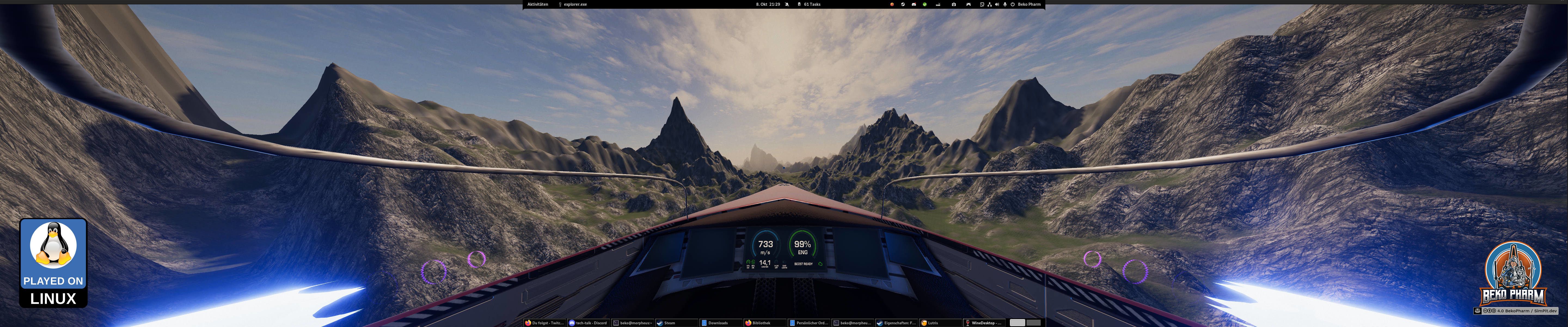
Primary Buffer Panel
- 🖥️ Full 5760x1200 on triple head setup
- 🕹️ X52 Pro as virtual gamepad
- 🕹️ Primary Buffer Panel as virtual keyboard
- 🎧 Head tracking
- 🔧 Multi-function display
- 🚦 Blinken lights
What’s not to like about Fly Dangerous. It’s a FOSS 6dof racing game with a Newtonian flight model similar to Elite Dangerous, does HOTAS, Opentrack and a lot of other stuff, like VR. It even offers a UDP port to retrieve ship telemetry. A perfect candidate for a simulated cockpit and I’m with it for quite some time. Integrating it into my plumbing pipeline was a breeze.
There are a bunch of videos showcasing Fly Dangerous with my Primary Buffer Panel on my YouTube and PeerTube accounts.
Launch parameters
I usually play Fly Dangerous on Linux PC. The Linux version 5 defaulted to OpenGL and this resulted in like 25 FPS for me and the input of my X52 Pro (mapped as virtual gamepad) was so laggy that I could sip coffee during each course correction. This was when I remembered the magic parameter -force-vulkan from other Unity games and from here it was smooth sailing. Eventually I ended up with the game start options obs-gamecapture for recording, mangohud for some FPS info and -force-vulkan for… well, FPS.
obs-gamecapture mangohud %command% -force-vulkan
I switched to Proton because I was eager to see some upcoming changes, like head tracker support, on the public_beta branch. And while this works I was once more flabbergasted how complicated it is to set my desired display resolution of 5760x1200. I’m using a multihead setup with several displays and as usual the game engine would not let me simply set that. Even in windowed mode (I mean I get that this won’t work with fullscreen).
There are several ways to work around this, especially with Proton, but I was looking for the prefs file I know from Linux. I found it in the end in the file compatdata/1781750/pfx/user.reg (that’s like the Windows registry but as plain file read by Wine) where the values are stored as dword under [Software\\StarGoat\\FlyDangerous]. In hex!
<pref name="Screenmanager Resolution Height" type="int">1200</pref>
<pref name="Screenmanager Resolution Width" type="int">5760</pref>
<pref name="Screenmanager Resolution Use Native" type="int">0</pref>Why games|engines in 2023 still seem to have ideas about screen layouts is frankly beyond me.
Head tracking
Just works with Opentrack because Fly Dangerous supports this via UDP port.