Star Citizen

1.0 2.0 4.0
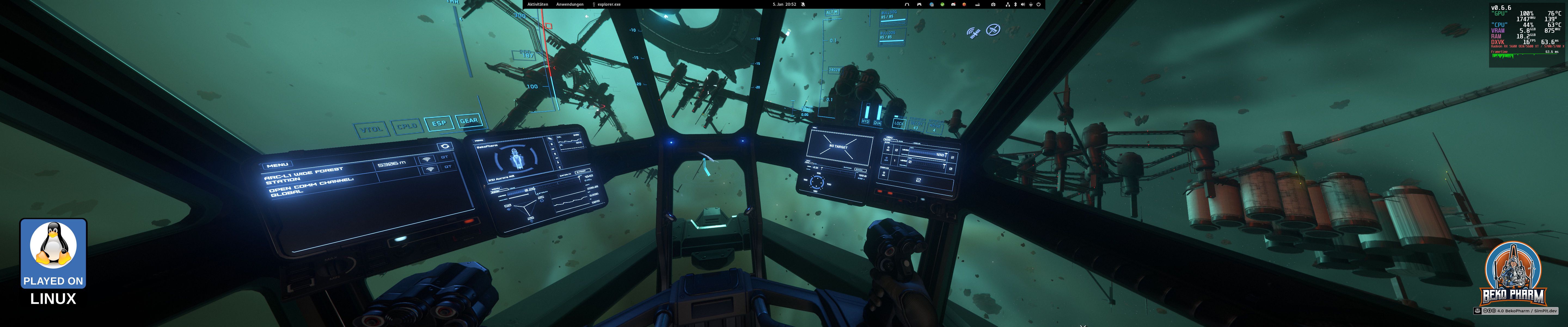
Learning how to fly in Star Citizen in an asteroid field

Primary Buffer Panel

Star Citizen does not export any kind of API to fiddle with. Sadly I doubt it’ll ever happen. Heck they even added EAC recently and the moment someone even mentions this they get dogpiled by competitive players whining that this would make bots possible. No, this is not how computers work. Bots happen with or without a provided API.

Anyway, this is why I can not really show live game data on the MFD or control the status indicators properly. I can only guess based on button presses what they should currently display but that is off fast. Heck, even the game itself has broken status indicators, like stuck missile warnings or a broken Altimeter.

There are a bunch of videos showcasing Star Citizen with my Primary Buffer Panel on my YouTube and PeerTube accounts.

Launch parameters

Like most games does this one also not detect a screen layout but only the primary display on a Linux PC so it won’t offer the maximum resolution possible e.g. with a triple head setup πŸ–₯️πŸ–₯️πŸ–₯️. This can be worked around in multiple ways, e.g. with configuring a virtual desktop in the WINEPREFIX, by adding a virtual monitor to the system or simply by making use of gamescope, the SteamOS session compositing window manager.

Here is an example how games may be started from Steam by adding the following commands to the start parameters (That’s basically the same for e.g. Lutris btw).

gamescope -h 1200 -w 5760 -H 1200 -W 5760 -b -e – %command%

This is not needed if only one monitor is used for gaming.

I love to play many games with my XR glasses in Side-By-Side mode where each eye is fed with a slightly different camera position resulting in 3D depth perception.

This is similar to VR but does not offer e.g. a backchannel for head tracking. Some games, like Elite Dangerous, support this natively. Other games can be forced into a SBS like mode with ReShade and a plugin like SuperDepth3D or Rendepth Reshade. In theory are Reshade shaders compatible with vkBasalt but the depth stuff is apparently exempt from this rule so that is not an option. The approach works nicely with Proton though.

The reshade-linux repo is very useful to get you started but the required steps can be done manually too, of course.

You will need gamescope on top though, because the output has usually to be rescaled or the display ratio is completely off. This also depends on the glasses. Mine do FULL SBS so a resolution of 3840x1080 is excepted in the end.

For Elite Dangerous the correct settings would e.g. be:

gamescope -h 2160 -w 3840 -H 1080 -W 3840 –scaler stretch -e – %command%

Other games may require slightly different settings here. This is an example for Ace Combat 7: Skies Unknown with Reshade and the SuperDepth3D shader:

WINEDLLOVERRIDES=“d3dcompiler_47=n;dxgi=n,b;” gamescope -h 1080 -w 1920 -H 1080 -W 3840 –scaler stretch -b -r 60 -e – %command%

YMMV but the general idea should work with almost any game.

This is one of the few games that I do not have on Steam for obvious reasons. Lutris has me covered though and the Star Citizen Linux User Group (LUG) does a very of a good job in maintaining the lug-helper scripts collection for easier installation and configuration of Star Citizen on Linux PC. It also takes care of the still persisting EAC issue for Linux gamer: https://github.com/starcitizen-lug/lug-helper

Demo

Watch this video on YouTube PeerTube

Referral Code

Yeah no. Fck this πŸ’©. Get on the hype train or leave it. Personally I got the Aurora starter package for my birthday and that’s it. It’s an awesome tech demo, a great walking simulator and a bug feast with a very… unhealthy community forum. It’ll also probably never finish.

I’ll keep watching from the sides but I won’t pour any money into this until the focus shifts more to simulation that is not even more PvP. This includes an often requested API.